Validating and Exploring DNSSEC with dig
Posted by darkskiez in Networking on August 10, 2010
Now that the Root DNS nameservers and .org TLD have both been signed, you can validate DNS server responses are legitimate.
In an attempt to learn better how this all hangs together, I thought I’d first try and validate some requests.
My first difficulty was figuring out what the root nameserver key is, what format it needs to be in, where you store it, and how to use it with dig to validate. Of course, the keys themselves are stored in DNS, you can query them in the format DIG needs to read them back with the command:
dig +nocomments +nostats +nocmd +noquestion -t dnskey . > trusted-key.key
This can be placed in /etc/trusted-key.key if desired for site-wide dig use, or else it will search the current directory for it.
If the file cannot be parsed, dig when you try to use it in dnssec mode will print:
No trusted keys present or ;; No trusted key, +sigchase option is disabled
To test out a full chain of validation from the root, you can now try to resolve www.isc.org
dig +topdown +sigchase +multiline -ta www.isc.org -- snip -- ;; OK a DS valids a DNSKEY in the RRset ;; Now verify that this DNSKEY validates the DNSKEY RRset ;; VERIFYING DNSKEY RRset for isc.org. with DNSKEY:12892: success ;; VERIFYING A RRset for www.isc.org. with DNSKEY:7617: success ;; The Answer: www.isc.org. 600 IN A 149.20.64.42 ;; FINISH : we have validate the DNSSEC chain of trust: SUCCESS
Hooray, we have validation.
BitCoin Bugzilla Extension v0.1 Released
I was fascinated by the concepts behind BitCoin, one of the things it really needs
was trade to give the currency value. So I’ve started writing a plugin for BugZilla, to allow people to donate bitcoins to
various bugs in order to sponsor / vote / show their appreciation for the bug fixes and enhancements.
Source/Download: http://github.com/darkskiez/bitcoinbugzilla/archives/v0.1
GitHub: http://github.com/darkskiez/bitcoinbugzilla
Bugtracker: http://bugzilla.darkskiez.co.uk
Blog is now IPv6 Enabled
Posted by darkskiez in Networking on July 8, 2010
Although my awesome hosting company dreamhost are not serving up via IPv6 yet, I’ve IPv6 enabled by blog for them by using apache reverse proxy on my home machine.
I configured apache much like: http://linux.yyz.us/ipv6/proxy.html with a few differences
1. I didnt use NameVirtualHost, just put a specific IP in. NameVirtualHosts just feel a bit unnecessary with IPv6, and this way i can point several aliases at the entry without defining them all. This may be considered a small security issue, as other people could point their illegitimate domain names at your site and it would still work and look official.
2. So i didnt have to register all of the aliases, i did not enable ProxyPreserveHost
3. As bryars.eu would resolve to AAAA and A, I didn’t want Apache to get in a loop and proxy to itself, so i added an alias v4 to ensure v4 only forwarding.
For some reason it was sending 301 redirects until the DNS was all sorted
# Contents of /etc/apache2/sites-available/bryars.eu-proxy <VirtualHost [2001:470:9272:1::2]> ServerName bryars.eu CustomLog /var/log/apache2/bryars.eu-proxy.log combined ProxyRequests Off <proxy http://v4.bryars.eu/*> Order deny,allow Allow from all </proxy> ProxyPass / http://v4.bryars.eu/ ProxyPassReverse / http://v4.bryars.eu/ </VirtualHost>
Also added the IP address to my /etc/network/interfaces so it would get allocated when the tunnel came up, by adding the following line to my tunnel interface stanza:
up ip addr add 2001:470:9272:1::2/64 dev $IFACE preferred_lft 0
The preferred_lft 0 is to mark the ip as deprecated so it doesn’t get used as the default address for outgoing connections. For more information see: http://www.davidc.net/networking/ipv6-source-address-selection-linux
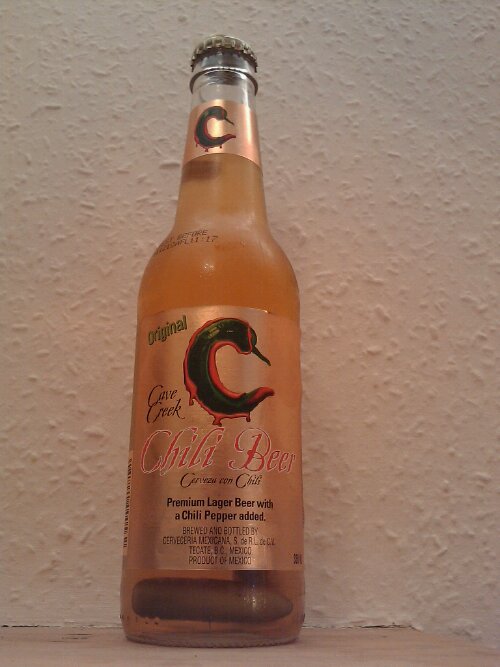
Chili Beer

With Chillies in! Yum.
Where: Byres Road Peckhams
Cost: £1.89
Strength: 4.2% Vol
Verdict: Better than expected, light lager with subtle and warming chili taste. Small Bonus for screw top, slightly overpriced. 7/10
The first two bottles had only one chili in, this one has two, same strength of chili flavour though it still feels like winning a little prize.
Debian IPv6 Configuration and Lessons Learned
Posted by darkskiez in Networking on July 2, 2010
I’ve had a few issues configuring IPv6 on Debian
If due to a misconfiguration a v4tunnel interface you have brought up with ifup has failed, you need to manually delete it before trying again or this annoying error will happen:
# ifup somev6tunnel
ioctl: No buffer space available
# ip tunnel del somev6tunnel
# ifup somev6tunnel
#
I was trying to configure a 6to4 tunnel but without specifying a local interface address by using local any endpoint any, but that gives an unhelpful and yet increasingly familiar error message.
# ifup 6to4
ioctl: No buffer space available
Linux doesn’t like both local and remote values unset, so I thought, aha I’ll just use local any endpoint 192.88.99.1, it appeared to work. I have since realised that it only works for talking to non 6to4 hosts, if I tried to talk to another 6to4 host, it routed the packets through the gateway instead of directly and the return packets were also lost. So, I just specified the local address and it works.
My working 6to4 debian /etc/network/interfaces
auto 6to4
iface 6to4 inet6 v4tunnel
address 2002:561e:XXXX::1 # ipv6calc -I ipv4addr -O ipv6addr -A conv6to4 86.30.XX.XX
netmask 16
local 192.168.1.2 # address assigned by wifi router
endpoint any
gateway ::192.88.99.1 # 6to4 anycast address
Though its best to use a managed tunnel, like Hurricane Electrics tunnelbroker.net
The is the Debian network interfaces config i used to connect to my tunnelbroker.net ipv6 tunnel, reconfigure the tunnel endpoint dynamically, and also add one of my routed /48 subnets to the interface (so i can use pretty reverse dns addresses from my host).
auto he-ipv6
iface he-ipv6 inet6 v4tunnel
address 2001:470:1f08:xxxx::2
netmask 64
endpoint 216.66.80.26
gateway ::216.66.80.26
# Docs to generate pass etc from http://ipv4.tunnelbroker.net/ipv4_end.php
up wget --no-check-certificate -O - 'https://ipv4.tunnelbroker.net/ipv4_end.php?ipv4b=AUTO&pass=9c4db7a186c8xxxxxxxxxxxxxx&user_id=ef2ffab0c775dxxxxxx&tunnel_id=19xxx' 2>/dev/null
up ip addr add 2001:470:XXXX:1::1/64 dev $IFACE
Barclaycard RFID Exploring
Posted by darkskiez in Electronics, Personal on July 2, 2010
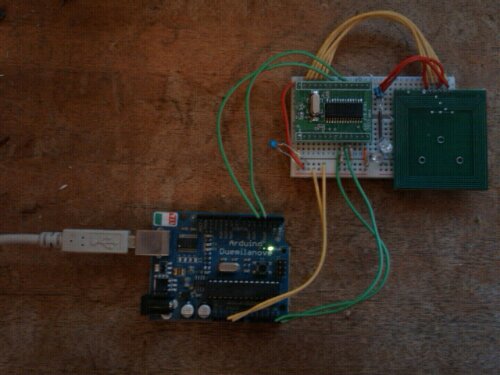
Waived my card over my Arduino Powered SM130 RFID reader to see what it would say..

Student Card: Mifare 1K(2) : 2ADEXXXX
Barclay Card: Unknown Tag(FF) : 09A1XXXX
It’s compatible with the usual RFID standards to some degree, enough to give the same serial number every time, unlike my passport which randomises its ID each activation, but not surprisingly it doesn’t read on my basic reader, probably a more advanced one would get further..
IPv6 Sage Certified
Yay, thanks to their new free DNS service, I have been able to complete Hurricane Electrics IPv6 certification course, and they are sending me a T-Shirt!
Highly recommend working your way through their course if this interests you.
New RFID Barclaycard
Posted by darkskiez in Electronics, Personal on May 20, 2010
Got a new barclaycard with RFID in the post today
I wonder if the RFID bit is MiFare compatible.. will try my reader later, not sure I’m happy about it.
The chip/pin bit seems to be compatible with my co-operative/Smile.co.uk card reader too, which surprised me but pleases me that I wont need lots of incompatible bits of junk for two-factor authentication.
Hello World
Just getting started on this blog. Cant even think of a good name for it yet, nevermind a caption =]
Don’t expect this to be wordy or regularly updated, and I expect will probably be more of a tech diary than a personal blog, but we’ll see how things develop, as I would rather facebook did not own all data about my life.